Best Free Text Splitter Tool Online: Split Text by Character Count Easily in 2025
In today’s fast-paced digital world, managing text length is crucial for content creators, social media managers, and marketers. Whether you’re crafting engaging Twitter threads, preparing SMS campaigns, or repurposing blog content for social platforms, exceeding character limits can be a hassle. Enter the Text Splitter tool from MicroQIT – a free, browser-based solution that splits text by character count effortlessly. This guide will explore everything you need to know about this powerful tool, helping you optimize your content for maximum impact.
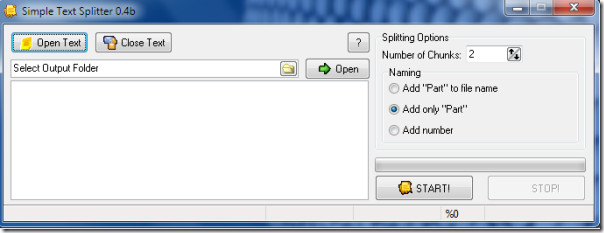
 Image: A visual representation of a text splitter interface, showing how text is divided into manageable chunks.
What is a Text Splitter Tool?
A text splitter is an online utility designed to divide large blocks of text into smaller segments based on a specified character limit. Unlike simple word counters, it focuses on precise character-based splitting, including spaces, punctuation, and special characters. This ensures your content fits perfectly within platform restrictions, such as Twitter’s 280-character limit or Instagram’s caption constraints.
The MicroQIT Text Splitter stands out by processing everything locally in your browser, ensuring complete privacy and instant results. No more worrying about data uploads or server delays – it’s fast, secure, and free.
Key Features of the MicroQIT Text Splitter
This tool is packed with features that make text management a breeze. Here’s what sets it apart:
- Character-Based Splitting: Accurately divides text into chunks up to your set limit, preserving the original structure.
- Real-Time Processing: See splits happen as you type or paste, with live character counts for each chunk.
- Easy Copy Functionality: Copy individual chunks or all at once, complete with numbered labels for organization.
- Privacy Protection: All operations occur client-side via JavaScript – no data leaves your device.
- Multilingual Support: Handles Unicode characters for languages like English, Spanish, Chinese, Arabic, and more.
- Formatting Preservation: Keeps line breaks and spaces intact for natural readability.
- Platform Compatibility: Ideal for texts from short messages to thousands of characters.
These features make it an essential tool for anyone dealing with character-limited content.
 Image: An illustration demonstrating how a document is split into smaller chunks by character count.
How to Use the Text Splitter Tool
Getting started is simple and intuitive. Follow these steps to split your text:
- Visit the Tool: Head over to the MicroQIT Text Splitter page.
- Set Your Character Limit: Enter the maximum characters per chunk based on your platform (e.g., 280 for Twitter).
- Input Your Text: Paste or type your content into the input area.
- Review the Splits: The tool automatically generates chunks with character counts displayed.
- Copy and Use: Use the copy buttons to grab what you need and paste it into your platform.
Pro Tip: Always preview your chunks to ensure natural breaks, and adjust for elements like hashtags or links that consume characters.
Benefits of Using a Free Text Splitter
Why choose the MicroQIT Text Splitter over manual methods or other tools? Here are the top benefits:
- Time Efficiency: Automate the splitting process to save hours on manual edits.
- Accuracy and Consistency: Avoid errors in character counting for professional results.
- Enhanced Engagement: Create readable threads that keep audiences hooked.
- Versatility: From social media to API integrations (like OpenAI or Twilio), it’s adaptable.
- Cost-Free: Completely free with no hidden fees or subscriptions.
- Improved Workflow: Integrate seamlessly into your content creation routine.
By using this tool, you’ll boost your productivity and ensure your messages land perfectly every time.
Applications Across Platforms
The Text Splitter is versatile for various use cases:
- Social Media Management: Split long posts into Twitter threads or LinkedIn updates.
- SMS Marketing: Divide campaigns into 160-character messages.
- Content Repurposing: Turn blog articles into bite-sized social series.
- API and Development: Handle character limits in prompts or data transmissions.
- Writing and Editing: Manage meta descriptions, email subjects, or WhatsApp messages.
Check out this infographic for common platform limits:
 Image: Infographic showing character limits for popular social media platforms like Facebook, Twitter, LinkedIn, and more.
| Platform | Character Limit |
|---|---|
| Twitter/X | 280 |
| Instagram Caption | 2,200 |
| LinkedIn Post | 3,000 |
| Facebook Update | 63,206 |
| SMS | 160 |
This table highlights why a reliable splitter is indispensable.
Why Choose MicroQIT’s Text Splitter for Your Needs?
In a sea of online tools, MicroQIT’s offering excels in simplicity, security, and speed. It’s optimized for users who value privacy and efficiency, making it ideal for professionals and hobbyists alike. Whether you’re a marketer optimizing for SEO or a writer crafting compelling narratives, this tool will elevate your game.
Ready to try it? Visit the Text Splitter now and experience hassle-free text management.
Conclusion
Mastering text splitting can transform your content strategy, leading to higher engagement and better reach. The free MicroQIT Text Splitter is your go-to solution for splitting text by character count online. Don’t let character limits hold you back – start splitting today and watch your page views soar!
If you found this guide helpful, share it on social media or leave a comment below. For more productivity tools, stay tuned to our blog.