Cron Expression Validator: Test and Validate Your Cron Syntax Online for Free
In the world of system administration and software development, automating repetitive tasks is essential for efficiency. Cron expressions are a powerful way to schedule jobs in Unix-like operating systems, but crafting the perfect cron syntax can be tricky. Mistakes in cron expressions can lead to missed executions or unexpected behavior. That’s where our free online Cron Expression Validator comes in – a user-friendly tool designed to help you test, validate, and understand your cron schedules effortlessly.
Whether you’re a seasoned DevOps engineer or a beginner learning Linux automation, this tool simplifies the process of working with cron jobs. In this comprehensive guide, we’ll explore what cron expressions are, why validation is crucial, and how our tool at MicroQIT can boost your productivity.
 Alt: Diagram illustrating the structure of a cron expression with fields for minute, hour, day, month, and day of week.
What is a Cron Expression?
A cron expression is a string of five (or sometimes six) fields separated by spaces, used to specify when a job should run. It originated in Unix systems and is widely used in tools like Linux crontab, Kubernetes CronJobs, Jenkins, and more.
The standard five-field format is:
- Minute (0-59)
- Hour (0-23)
- Day of Month (1-31)
- Month (1-12 or JAN-DEC)
- Day of Week (0-7 or SUN-SAT, where 0 and 7 are Sunday)
Special characters enhance flexibility:
*: Any value-: Range (e.g., 1-5 for Monday to Friday),: List (e.g., 1,3,5)/: Step (e.g., */5 for every 5 minutes)
For example, 0 9 * * 1-5 means “Every weekday at 9:00 AM.”
Understanding cron syntax is key to reliable scheduling, but manual testing can be error-prone. That’s why tools like our validator are invaluable.
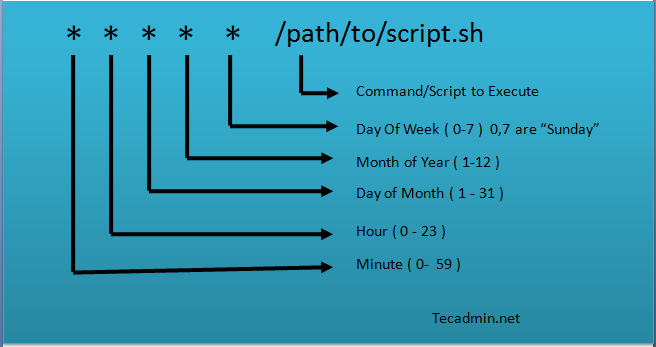 Alt: Illustration of a cron job structure in Linux, showing fields and command execution.
Why Validate Cron Expressions?
Invalid cron expressions can cause:
- Jobs not running as expected
- System overload from too-frequent executions
- Wasted time debugging in production
Validation ensures:
- Syntax correctness
- Human-readable interpretations
- Predictions of next run times
Our online tool provides real-time feedback, helping you avoid common pitfalls like timezone issues or overlapping jobs.
Introducing the MicroQIT Cron Expression Validator
At MicroQIT, we’ve built a robust, free online tool that goes beyond basic validation. It’s an all-in-one resource for testing cron expressions, complete with educational content and practical examples.
Key highlights:
- Real-Time Validation: Instantly check if your expression is valid.
- Human-Readable Descriptions: Converts complex syntax into plain English, e.g., “Every Sunday at midnight.”
- Next Execution Times: See upcoming run dates based on the current time.
- Field Breakdown: Detailed analysis of each field with ranges and values.
- Example Library: Pre-built expressions for common scenarios like backups and reports.
No downloads or installations needed – just visit the page and start validating!
 Alt: Screenshot of an online cron expression validator interface showing input fields and generation options.
How to Use the Cron Expression Validator
Using the tool is straightforward:
- Navigate to https://microqit.com/cron-expression-validator.
- Enter your cron expression in the input field (e.g.,
*/5 * * * *). - Watch as the tool validates it in real-time, displaying “Valid” or highlighting errors.
- Review the human-readable output and field breakdown.
- Check the frequency (e.g., “Every 5 minutes”) and next execution times.
- Experiment with variations or use the built-in examples for inspiration.
It’s that simple! Perfect for quick tests during development or troubleshooting.
Features of Our Cron Validator Tool
Our tool stands out with these advanced features:
- Frequency Analysis: Identifies patterns like “Weekdays” or “Quarterly.”
- Error Handling: Provides insights into common mistakes and solutions.
- Supported Formats: Handles standard five-field expressions with special characters like
*,-,,,/, and?. - Educational Sections: Learn about cron syntax, best practices, and alternatives like Systemd Timers or AWS EventBridge.
- Real-World Examples: Includes full command lines for scenarios like database backups or API rate limit resets.
Whether you’re scheduling e-commerce order processing or log rotations, our tool ensures your expressions are spot-on.
 Alt: Detailed diagram of cron expression fields including second, minute, hour, day, month, and year (optional).
Common Cron Expression Examples
Here are some popular expressions you can test in our validator:
| Expression | Description | Use Case |
|---|---|---|
0 9 * * 1-5 | Every weekday at 9:00 AM | Daily office tasks |
0 0 * * 0 | Every Sunday at midnight | Weekly maintenance |
*/5 * * * * | Every 5 minutes | Frequent monitoring |
0 0 1 * * | First day of every month at midnight | Monthly reports |
0 */2 * * * | Every 2 hours | Regular backups |
For advanced patterns:
- Business hours:
0 9-17 * * 1-5 - Every quarter hour:
0,15,30,45 * * * * - First Monday of the month:
0 9 1-7 * 1
Copy these into the tool to see them in action!
Best Practices for Cron Jobs
To maximize reliability:
- Always log outputs (e.g.,
>> /var/log/job.log 2>&1). - Use absolute paths in commands.
- Set environment variables explicitly.
- Avoid peak hours for heavy tasks.
- Implement locking to prevent overlaps.
- Monitor jobs with tools like Cronitor.
Our validator includes a section on pitfalls, such as missing environment variables or permission issues, with practical solutions.
Frequently Asked Questions (FAQs)
What if my cron job isn’t running?
Check syntax with our validator, review logs (/var/log/cron), and ensure permissions are correct.
Can cron handle sub-minute intervals?
Standard cron is minute-based; for seconds, consider alternatives like Systemd or APScheduler.
What’s the difference between * and */1?
They’re equivalent – both mean “every” unit.
How do I schedule for the last day of the month?
Use workarounds like daily checks, as standard cron doesn’t support it directly.
For more answers, visit our tool’s FAQ section.
 Alt: Visual representation of cron job scheduling fields in Linux.
Conclusion
Mastering cron expressions doesn’t have to be complicated. With the MicroQIT Cron Expression Validator, you can validate, test, and optimize your schedules in seconds. Save time, reduce errors, and automate with confidence.
Ready to try it? Head over to https://microqit.com/cron-expression-validator now and start validating your cron expressions for free!
If you found this guide helpful, share it with your network and bookmark our site for more tech tools and tips. For questions or feedback, contact us via the site. Happy scheduling!